

Every SATCOM engineer knows the feeling: the tool you need is almost there, split across different desktop applications or buried in an old spreadsheet, so you end up stitching things together yourself, every single time.
So, we built the suite we always wanted: six browser-based engineering utilities, shared free with the field, that run entirely in your browser and keep your TLE files, observer coordinates, and log data on your machine.
.png?width=120&height=120&name=andrew%20(1).png)
"One of our core values is community. We wanted to build these tools to share with the field, to share the wealth."
— Andrew Correnti, Senior Architect, Radeus Labs
The Tools: Six Utilities, All Free, All Instant
These tools replace work that used to require specialist software, a paid subscription, or a lot of manual effort, and now put that capability directly into a browser tab.
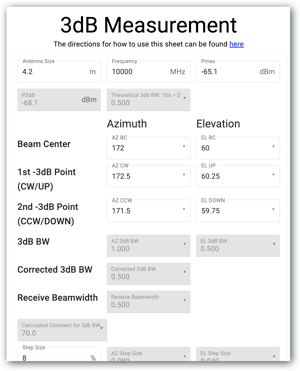 1. 3dB Measurement Calculator [RF & Antenna]
Before: Antenna characterization math done by hand, in a spreadsheet, or inside a desktop RF tool that required a license.
Now: Enter your measured data and get beamwidth and bandwidth parameters computed instantly. If you have been eyeballing figures or relying on vendor datasheets, this gives you a faster, more precise alternative.
2. IESS Record Validator [Compliance]
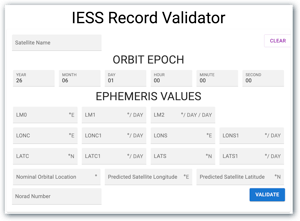 Before: Formatting errors and missing fields in IESS records discovered after a rejected submission.
Now: The validator surfaces bad values, out-of-range entries, and missing mandatory fields before you submit. This removes a frustrating source of delays.
3. Single Satellite Track Generator [Satellite Tracking]
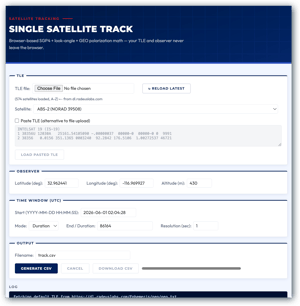 Before: Generating an AZ/EL/POL track file required a licensed pointing or propagation package.
Now: Provide a TLE file and your observer location, set your time window and resolution, and export a CSV track file from the browser. It uses SGP4 propagation to compute the math. The result is a CSV ready for ACU pointing.
4. Beamwidth Calculator [RF & Antenna]
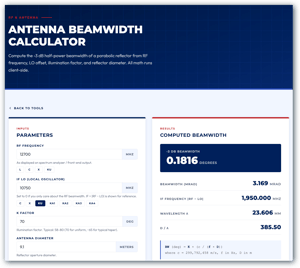 Before: These calculators exist all over the internet and are easy to do with a calculator or a spreadsheet; but putting this at the tip of your fingers makes this suite more complete and easier to use.
Now: Enter your frequency, LO offset, K factor, and antenna diameter and get results in degrees and milliradians. The reverse mode lets you enter an IF reading and back-solve to the sky RF, with low-side/high-side disambiguation built in.
5. ACU Log Viewer [Telemetry]
This particular tool is specific to Radeus systems. If you are running our ACU hardware, here is what it unlocks.
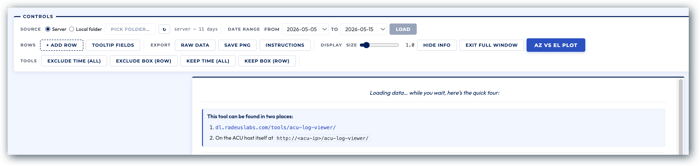
Before: Making sense of ACU telemetry logs meant loading dense data files into dedicated data visualization software, typically a per-seat subscription that not every operator or customer wants to procure and maintain.
Now: Load your log data into the browser-based viewer and plot any column over a chosen date range. Pan, zoom, overlay channels, color by signal quality, and exclude bad data, all without sending your data to a server. A sample dataset is available on the page if you want to see it before connecting your own system.
6. Multi-Satellite Sky Chart [Satellite Tracking]
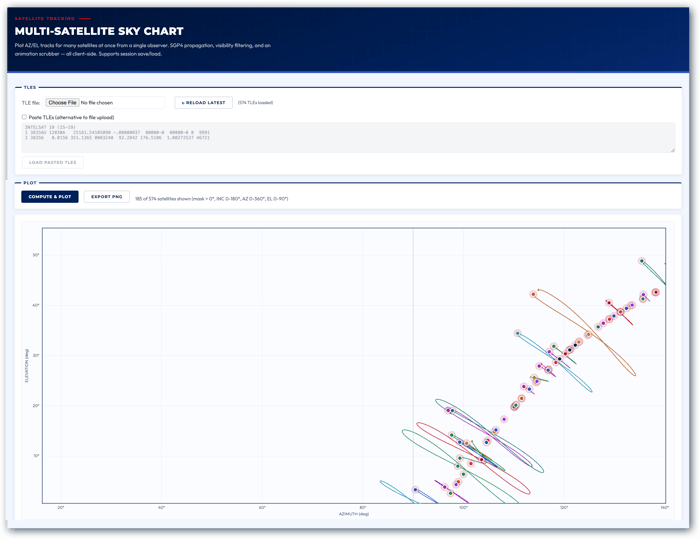
Before: Getting a "what can I see from this site right now" view required stitching together catalog data, a propagator, and a separate plotting tool.
Now: Enter your observer location, and the tool plots AZ/EL sky tracks for satellites across the visible arc. Filter by visibility, band, inclination, and elevation mask, then scrub through the time window to animate satellite movement. Live analemmas make it easy to see which satellites are station-kept and which are drifting.
Real-World Scenario: Low Signal on a Ku Dish
Let's say a teleport operator has a low receive signal on a 9.1 m Ku dish from a satellite near 166E. They can:
- Use the Multi-Satellite Sky Chart to confirm the satellite is visible, then check the right band and polarization.
- Use the Beamwidth Calculator to back-solve the modem’s IF reading to sky RF and see whether a pointing error is likely.
- Use the Single Satellite Track Generator to create a fresh AZ/EL/POL track and re-peak the antenna.
Built with AI: Engineering at the Speed of the Problem
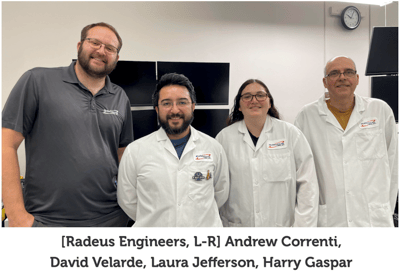 The Radeus engineering team would like to note that every one of these tools was built using AI-assisted development. The engineering logic is ours (the satellite mechanics, the RF math, the propagation models, the telemetry schemas), but AI compressed what would have been several weeks of full development time into approximately two days of focused work.
As Andrew puts it:
"We chose to use AI, and the result is not just better internal tooling. It is a free suite of utilities we can hand to every customer and operator in the field."
Tools that previously required a dedicated project, a budget approval, and a software team can now be prototyped, tested, and shipped fast enough to actually solve the problem you have this week, not next quarter.
A few numbers that illustrate our result with developing these tools with AI:
- 6 production tools shipped in approximately two days of development
- 0 installs, accounts, or license seats required to use any of them
- Roughly 97% of our internal data visualization workflow now handled without a paid subscription
Try It Now
All six tools are live and free to access HERE. We encourage you to check them out!


 Over the past few weeks, the Radeus Labs team has been on the road connecting with customers, partners, and new industry contacts. Computing and Recording Specialist Clay Moore attended