

.png)
AI and machine learning are reshaping how organizations approach R&D, particularly in defense, communications, and complex systems engineering with computing systems built for demanding environments. But in the rush to build systems that can handle advanced models and intensive data workloads with AI servers, many teams are encountering the same issue: their understanding of hardware requirements doesn't always match reality.
Misconceptions about AI hardware, especially in early-stage R&D environments, often lead to overspending, integration delays, and systems that are ultimately overbuilt, or worse, unusable for high GPU output computing.
Based on conversations with engineers at Radeus Labs and field experience across high-performance projects in custom computing systems, here’s what technical decision-makers need to know about making smarter AI-related hardware choices.
Myth vs. Reality: AI Hardware Isn’t Just About the Biggest GPU
When engineers or project managers hear “AI,” the default mental image is often a rack full of the most powerful GPUs on the market, with eye-watering specs and price tags to match.
The reality is far more nuanced.
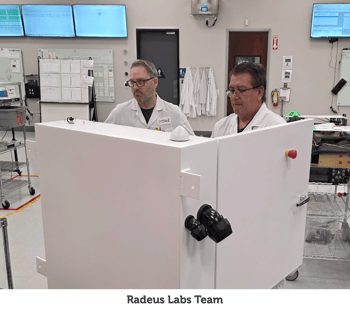 At Radeus Labs, engineers frequently engage with clients who have heard of a particular high-end processor or graphics card and insist it’s what they need.
As one of our engineers explained:
“Customers sometimes think, ‘I heard about this card, it’s the best of the best, so that’s what I want.’ But their application may not call for using the best of the best.”
In many R&D scenarios, especially in early prototyping, you don’t need the bleeding edge. What matters more is understanding what your AI model actually needs to run reliably and efficiently, matching your hardware accordingly, and leaving "headroom" for the future in high density, low power servers or other computing systems.
Key Hardware Considerations for AI in R&D
1. GPU Type and Memory
Not all GPUs are created equal, and not all GPU specs matter equally for AI.
Gaming cards, for example, are optimized for fast display rendering, while AI workloads typically depend on large memory bandwidth and tensor-core performance. More importantly, it's not just about “power.” It's about how that power is used.
In AI-focused R&D projects, what really counts is:
-
- Memory per GPU (e.g., 24GB+ for large models)
- CUDA core count (for NVIDIA cards)
- Support for parallelization (e.g., NVLink for multi-GPU systems)
Selecting the wrong card, just because it has a high clock speed or is marketed as “high performance”, can result in underutilized systems or costly rework down the line.
One of our engineers, Laura Jefferson, explains:
“You’re not so much looking at power in that sense as, like, how much RAM does this single graphics card have, and how will that affect the customer?”
2. RAM, CPUs, and Storage Throughput
While AI gets all the GPU hype, many workloads are CPU-bound or depend heavily on memory bandwidth and disk throughput, especially during data preparation, ETL, and model training phases.
In R&D, this often means:
-
- Selecting multi-core CPUs with strong single-thread performance (if preprocessing is a bottleneck)
- Using ECC memory to avoid instability in long-running jobs
- Prioritizing NVMe storage for fast read/write access to large training datasets
Overspecifying one component (like a GPU) while bottlenecking others (RAM or disk I/O) is a common and costly mistake.
3. Power and Thermal Constraints
AI hardware doesn’t operate in a vacuum. Power delivery and heat management are often the silent killers of early R&D builds.
At Radeus, we once had a project where the team had to sequence startup events, turning on fans, then lights, then motors, because the selected power supply wasn’t adequate for all systems running simultaneously.
That kind of issue isn’t theoretical. It’s one of the main reasons early-stage AI systems fail to scale. As AI hardware becomes denser and more power-hungry, these constraints must be considered upfront, especially when building for rugged or remote environments.
4. SWaP and Environmental Fit
In tactical and field-deployable use cases, size, weight, and power (SWaP) constraints override almost everything else. Even if a component is technically powerful enough for AI inference or training, if it’s too big, too hot, or too power-hungry, it’s the wrong choice.
This is where consultative partners, like the Radeus' engineering team, offer real value. Not just in sourcing high-performance parts, but in balancing them against the physical, environmental, and integration constraints of your actual use case.
Aligning AI Hardware with Actual Requirements
Ultimately, the best AI hardware setup for your R&D project depends on one thing: what you’re trying to accomplish.
It’s tempting to copy what Google, OpenAI, or others are doing with AI, but unless you’re training foundation models from scratch, you probably don’t need that scale. Most R&D teams working in applied AI are running inference, edge analytics, or fine-tuning pre-trained models.
That means your hardware needs will be different, and often more manageable than expected.
Smart, Not Flashy: How to Future-Proof Your AI Build
Rather than defaulting to high-cost, low-availability components, focus on:
- Modular systems you can scale up as your AI needs grow
- Consultative vendors who help you match hardware to actual model workloads
- Avoiding vendor lock-in by choosing platforms that support multiple AI frameworks and hardware integrations
Hardware-agnostic AI design can also help teams avoid being boxed into a single vendor ecosystem too early.
Get AI Hardware Right, Before It Slows You Down
AI is no longer an experiment, it’s a foundational part of modern R&D. But successful outcomes hinge on more than raw compute power. You need hardware that aligns with your use case, fits your operational environment, and won’t derail your project with sourcing or integration issues.
If you're facing the pressure of getting AI prototypes off the ground, or into production, don't leave your hardware decisions to chance.
Our incredible new guide, From R&D to Production: Essential Hardware & Support Considerations, dives deeper into the real-world decisions R&D teams must make to keep projects moving. Inspired by our very own engineering team, it covers key pitfalls to avoid, how to navigate sourcing constraints, and what to look for in hardware partners. Whether you're designing for AI, edge computing, or complex custom systems, this guide can help you move forward with confidence.
[Download the guide now] to build smarter, scale faster, and stay in control of your R&D timeline.